
Retirement planner · Web app + Google Sheet
Will your money last? Find out in an afternoon.
RetireBlueprint Pro shows how much you can safely spend each year, how your plan holds up if the market crashes, and whether Roth conversions and your Social Security timing are working for you.
Works on your computer, tablet or phone. Secure checkout on Etsy. No subscription.
- $149 onceNo monthly fee, ever
- 5,000 futuresMonte Carlo stress test
- Your Google SheetYour plan stays in a file you own
- Through age 110Every year projected, both spouses
What it answers
The questions that keep people up at night, answered with your own numbers.
How much can we safely spend?
The solver finds the most you can spend each year, phase by phase, and still meet your safety floor and the legacy you want to leave.
Safe-spend solverWhat if the market crashes the year we retire?
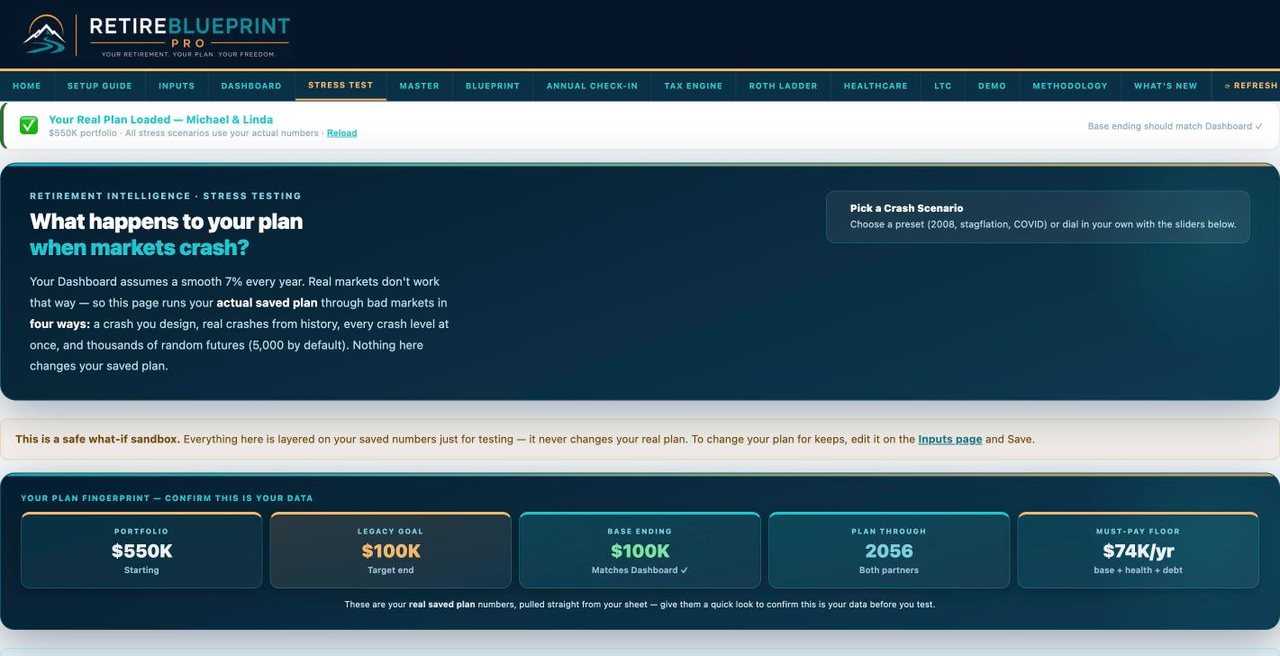
Replay 2008, the dot-com bust or COVID against your plan, or design your own crash, and see what you can still spend.
Stress testWhat are the real odds it lasts?
Run your plan through 5,000 randomized market histories with a realistic crash model and see best, typical and worst cases.
Monte CarloShould we convert to Roth, and how much?
See the conversion window year by year, the tax cost now, and the lifetime savings later, with IRMAA surcharges counted.
Roth ladderWhat will taxes and RMDs look like?
Federal brackets, Social Security taxation, required minimum distributions and your effective rate over the whole plan.
Tax engineWhat happens when one of us is gone?
The plan follows the surviving spouse: income changes, filing status, RMD rules and how long the money runs.
Survivor planWhat will health care cost?
Medicare premiums, IRMAA brackets and long-term care costs projected into your spending, not left as a guess.
Medicare & LTCWhen should we claim Social Security?
Model each spouse's claiming age, cost-of-living raises and the survivor benefit inside the full plan.
Social SecurityAre we still on track this year?
Each January, enter your actual balances and see whether you're ahead of or behind the plan.
Annual check-inSee it working
Real screens from a real plan.
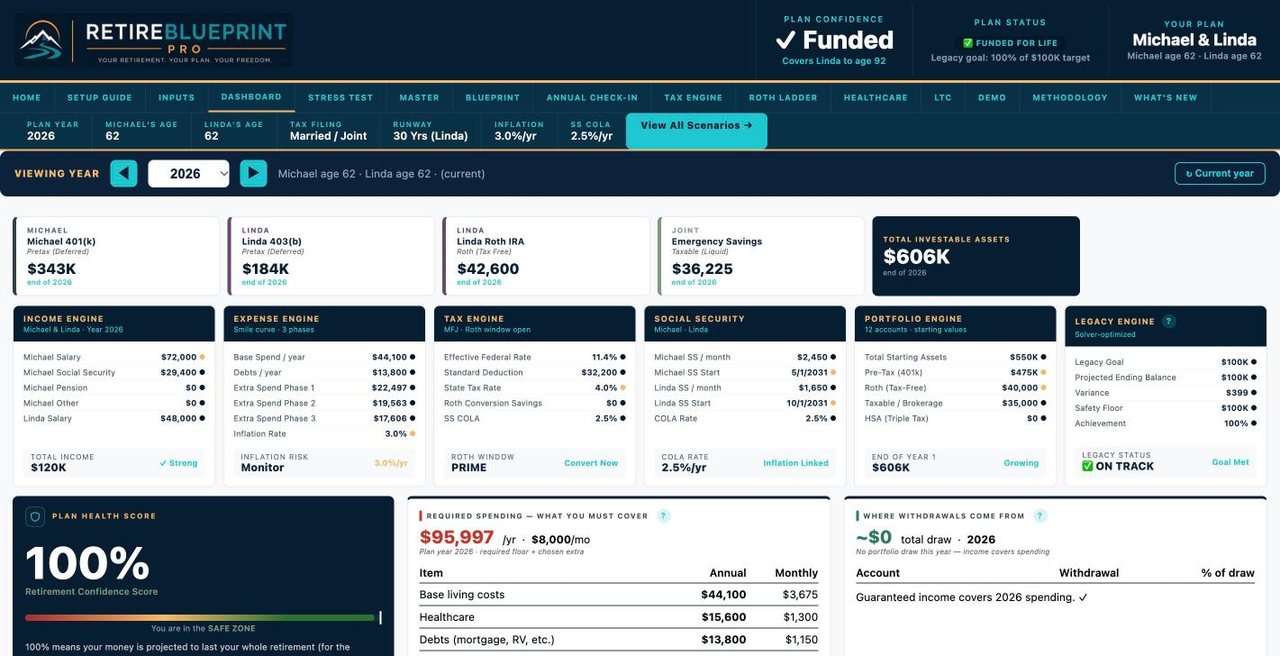
Michael and Linda are our sample couple. Every screen here is the actual app running their plan. It works the same on a laptop, a tablet or a phone.
Try it yourself
Open their real plan, on any device.
Click through every page of the app with Michael and Linda's numbers: the dashboard, crash tests, Monte Carlo, taxes and Roth. It's the same app you get, with their sample plan loaded.
Explore the sample planYour whole retirement on one dashboard
Plan confidence, safe spending for every year, home equity, taxes and income charts.
Crash-test the year you retire
Pick a real crash, drag the sliders and see what you can still safely spend.
See how much you can safely spend
Go-go, slow-go and no-go years, solved from your own numbers with your legacy goal still met.
Michael and Linda are a fictional sample couple. Your results depend on your own numbers. Want to look around yourself first? Open Michael and Linda's plan in the real app. Scroll every page and try the what-if sliders.
How it works
From checkout to your first answers in one afternoon.
Buy on Etsy
You get the Start Here guide and your setup code right away in your Etsy messages.
2 minutesMake your private copy
Copy the planner into your own Google account and connect it to the app with one link.
About 5 minutesEnter your numbers
Ages, accounts, Social Security estimates and spending. The dashboard, stress tests and tax views fill in on their own.
An afternoon
Private by design
Your plan lives in a file you own.
- Your own Google Sheet. Your numbers sit in your Google account, not in a company database.
- No bank passwords. You type in your balances. Nothing asks for your account logins.
- Works anywhere. Use it in any browser, or add it to your phone's home screen like an app.
- Optional auto-updates. If you already use Tiller, you can link your balances. It's off unless you turn it on.
Why it exists
Built for one family first.
I'm Gena. I built RetireBlueprint Pro to plan my own family's retirement, because the free calculators were too simple and the good software wanted a monthly fee forever.
So I built the tool I wanted: real tax math, real stress tests, and a price you pay once.
— Gena, founder
Pricing
One price. Yours to keep.
What you get
- The RetireBlueprint Pro web app: dashboard, safe-spend solver, stress tests, Monte Carlo, tax engine, Roth ladder, Medicare and long-term care pages.
- Your private Google Sheet planner, connected to the app.
- Start Here guide and full Setup Guide, with every input explained.
- Bonus: a step-by-step guide to putting the app on your phone's home screen.
Many retirement planning programs charge every month or every year. RetireBlueprint Pro is a single purchase.
FAQ
Common questions
Is it a spreadsheet or an app?
Both. Your numbers live in a Google Sheet that you own, and the web app reads that sheet to give you the dashboard, charts and stress tests.
What do I need?
A free Google account and a web browser on a computer, tablet or phone. No software to install.
Does it work for singles as well as couples?
The planner is built around one or two people, including what happens to the surviving spouse.
Is there a subscription?
No. You pay $149 once on Etsy.
How do I get it after I buy?
Etsy delivers your Start Here guide and setup code right away. Setup takes about five minutes.
Is this financial advice?
No. RetireBlueprint Pro is a planning and education tool. For decisions about your money, talk with a licensed financial professional.
I already bought it. Where's my plan?
Use Customer login at the top of this page, or the home-screen icon on your phone.
Questions before buying?
Email retireblueprintpro@gmail.com. Gena reads every message.